- HOME
- JOIN US
- FORUM
- OUR SERVERS
- OUR CLAN
- ADMIN ALERT
- CONTACT US
- DONATE
- WARS
- MATCHES
How to play a recording in RS2
LATEST NEWS
- Welcome to the PBS GAMETEAM's website, WE ARE RECRUITING , JOIN FOR FREE!. JOIN US and get a FREE VIP slot on our servers! -
- Do you like our servers or site? Support us on this page -
- Do you have a question? contact us -
- Join our Discord! -
- Check our latest news about our PBS games on this link -
- Would you like to donate for our servers? Please check this link -
- We are the best HLL, ARMA, BB, RS2, MW3 community out there! Sign up today! -
- Like us on Facebook! -
- Like us on Twitter! -
- We have many new wars! Check and signup here pls -
- Join our latest community event #here! -
- This topic has 0 replies, 1 voice, and was last updated 8 years, 8 months ago by
 Powerbits.
-
AuthorPosts
-
-
13/02/2018 at 11:52 #21181
PLAYBACK A RECORDING
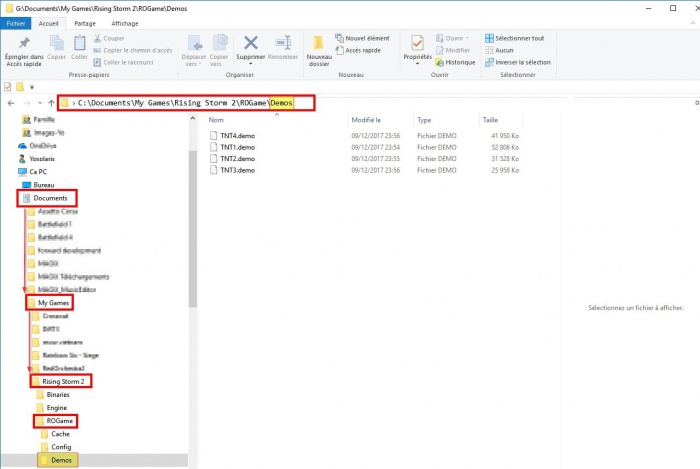
- Â Create a folder demos “D” capital in the directory ROgame
- Â Place your video files (format . demo) in the directory you just created is what you need:
- The default path must be this one
C:\Documents\My Games\Rising Storm 2\ROGame\Demos
- We run the game then F3 to open the console (you can do F3 as soon as you are on the menu)
- Enter the command demoplay yourvideo.demo
- In our example the video is called TNT1.demo, so we enter demoplay TNT1.demo

Some commands during playback
- To stop the video before the end of playback: STOPVIDE
- command simply , To accelerate the video: SLOMO 2 or SLOMO 3 to return to speed normal SLOMO 1
- Make a slow motion, (between hook the values ​​you can put)
DEMOPLAY slow [0,5 … 1] vosvideo.demo
-
-
AuthorPosts



Viewing 0 reply threads
- You must be logged in to reply to this topic.
© 2026 Powered by Powerbits 2022