
- HOME
- JOIN US
- FORUM
- OUR SERVERS
- OUR CLAN
- ADMIN ALERT
- CONTACT US
- DONATE
- WARS
- MATCHES
How to add [PBSr] tag on EGS
- Welcome to the PBS GAMETEAM's website, WE ARE RECRUITING , JOIN FOR FREE!. JOIN US and get a FREE VIP slot on our servers! -
- Do you like our servers or site? Support us on this page -
- Do you have a question? contact us -
- Join our Discord! -
- Check our latest news about our PBS games on this link -
- Would you like to donate for our servers? Please check this link -
- We are the best HLL, ARMA, BB, RS2, MW3 community out there! Sign up today! -
- Like us on Facebook! -
- Like us on Twitter! -
- We have many new wars! Check and signup here pls -
- Join our latest community event #here! -
- This topic has 2 replies, 2 voices, and was last updated 4 years, 5 months ago by
 MuttonChop.
-
AuthorPosts
-
-
04/12/2021 at 13:51 #78837
How to add tags on Epic Games:
1. Open your Epic Games launcher.
2. Click the letter in the upper right corner (most likely different letter for you).

3. Click Account (a new browser window will open)
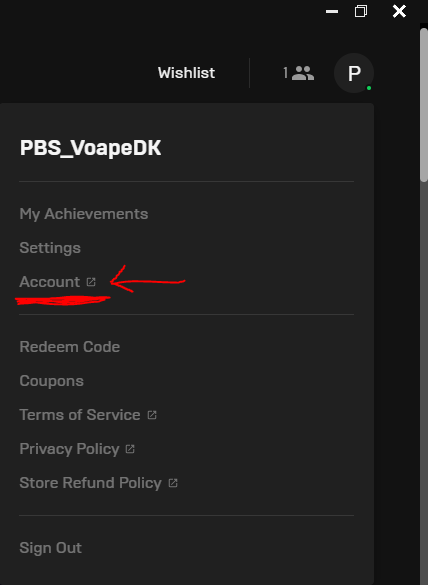
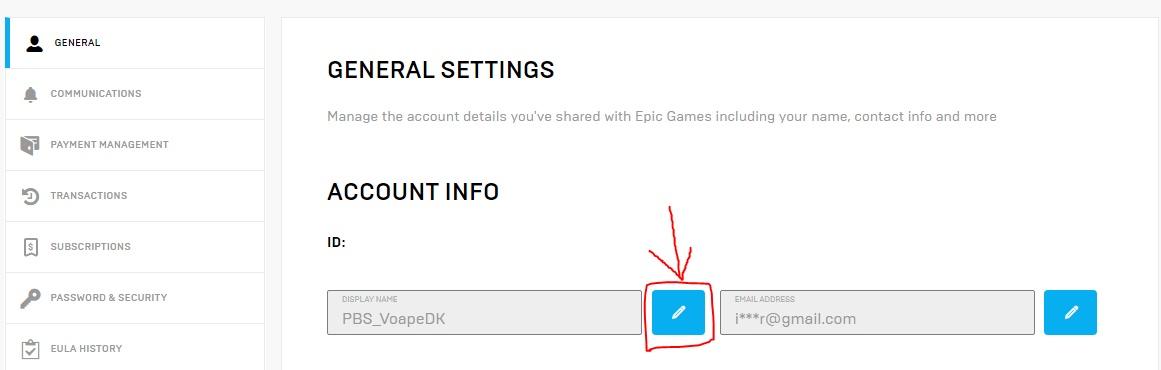
4. Click the blue button as shown on the image below:
   Â
5. Now it’s time to add your tag. Since Epic Games doesn’t allow the brackets, we will have to work around that.
As long as you have not been announced as a full member on both discord and the forum, you’ll wear the PBSr_ infront of your name.If we use me as an example, it would look like this: PBSr_VoapeDK
(Make sure there is NO spaces between the PBSr_ and your name)I hope this guide will be helpful for everyone. Feel free to PM me on discord, or reply here if you have any questions.
/Voape -
04/12/2021 at 17:37 #78870
Good one, will add it as procedure and sticky
-
18/04/2022 at 00:44 #87442
Thanks Voape this was very helpful
-
-
AuthorPosts









- You must be logged in to reply to this topic.