
- HOME
- JOIN US
- FORUM
- OUR SERVERS
- OUR CLAN
- ADMIN ALERT
- CONTACT US
- DONATE
- WARS
- MATCHES
How to manage bookings
LATEST NEWS
- Welcome to the PBS GAMETEAM's website, WE ARE RECRUITING , JOIN FOR FREE!. JOIN US and get a FREE VIP slot on our servers! -
- Do you like our servers or site? Support us on this page -
- Do you have a question? contact us -
- Join our Discord! -
- Check our latest news about our PBS games on this link -
- Would you like to donate for our servers? Please check this link -
- We are the best HLL, ARMA, BB, RS2, MW3 community out there! Sign up today! -
- Like us on Facebook! -
- Like us on Twitter! -
- We have many new wars! Check and signup here pls -
- Join our latest community event #here! -
- This topic has 0 replies, 1 voice, and was last updated 2 years ago by
 Powerbits.
-
AuthorPosts
-
-
15/09/2024 at 10:13 #122407
This is for the Admins who are managing bookings for a squad or event for example.
Goto calendar on the website: 
Then in calendar goto the date of the event 
Click on the date and immediately you see already some data about how many members signed up and you can use the dropdown box to see who…
In order to get more data as administrator, select “edit event” on top

Now go to the right bottom corner and select manage bookings

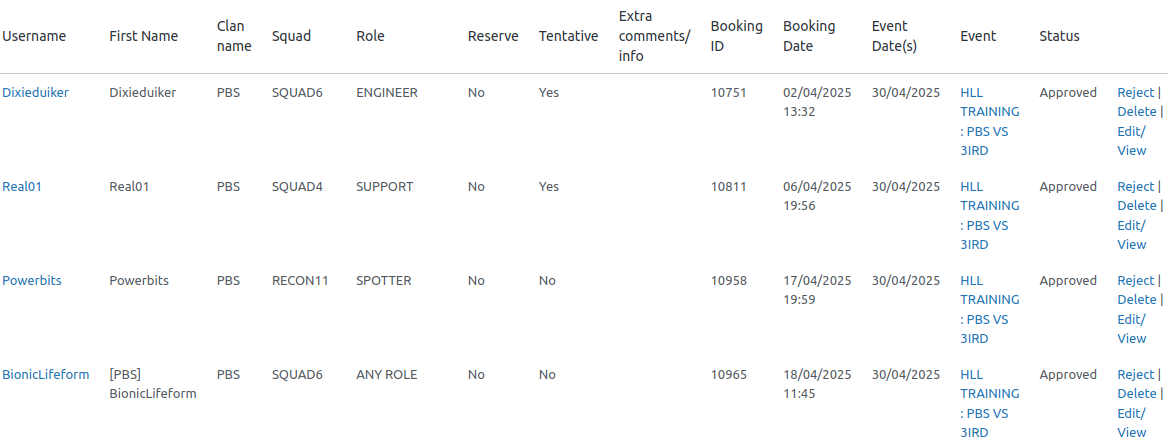
Now you see the full list, roles, squads, reserve etc.. you can decline or remove bookings or even export it all to excell.
To have a nice overview you can click on 
And adapt the fields you need to see like below, dont forget to save 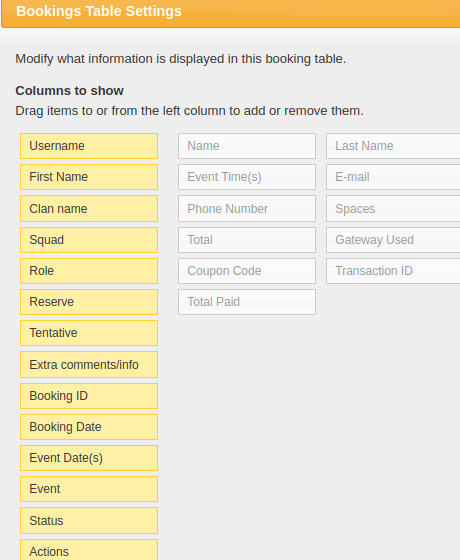
Great job!
-
-
AuthorPosts



Viewing 0 reply threads
- You must be logged in to reply to this topic.
© 2026 Powered by Powerbits 2022